Guide to Reading 3GPP Specifications for 5G NR and LTE
Guide to Reading 3GPP Specifications for 5G NR and LTE
Reading specs from 3GPP can sometimes be very difficult as there are so many specs, and navigating through each of them can be a daunting task. There is no definitive and clear guide on how to use the specs, navigate through all the technical jargon, and find what you are looking for.
In this short article, I will try to highlight how to navigate and read 3GPP Specs.
First things first, 3GPP releases technical specifications in multiple release cycles, and these specifications are updated with version numbers if there are any changes or updates. More about this in a later section of the article.
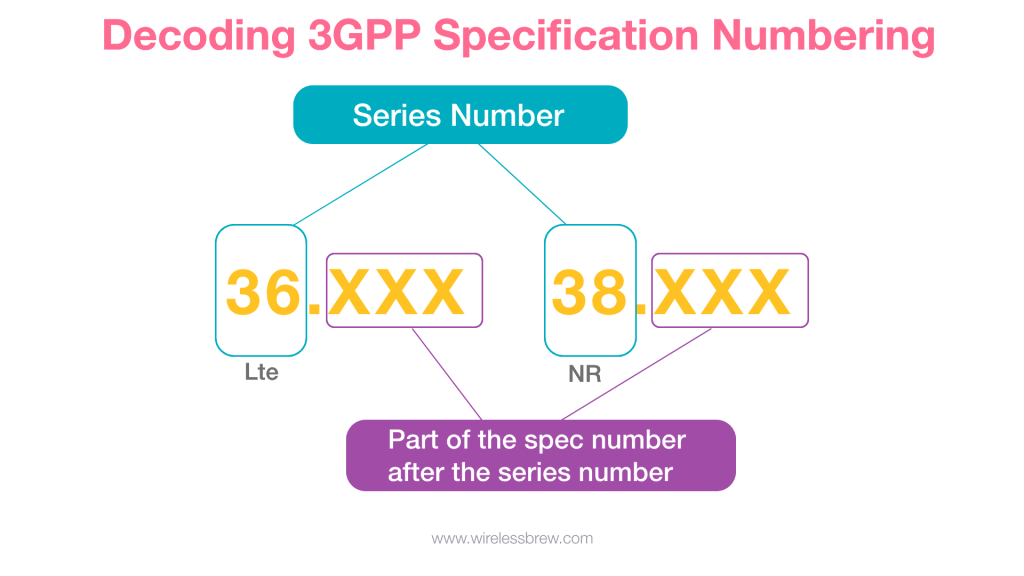
3GPP has multiple release cycles, and they have different spec numbers for each technology:
- LTE — 36.xxx Series
- 5G-NR — 38.xxx series
Where Can I Download the 3GPP Specifications From?
I have provided the links below which have a list of all 3GPP Specifications for 5G-NR and LTE.
All 5G-NR specifications start from Release-15 and later, whereas all LTE specifications start from Release-8 and later as LTE was introduced in Rel-8.
If you are new and getting started initially, I would advise not to start reading the specifications immediately, as you would find the specifications sometimes go into very granular detail. Some topics look vague and might not have a further explanation except with some reference to another document. While trying to find the references, it becomes a jigsaw puzzle quickly, and you lose track of what you were initially looking for. But if you have a good basic understanding of the technology, then please explore the different spec documents as it gives more exposure and information related to different protocol layers.
There are different elements in the network: there is a User Equipment, there is a Radio Network, and then there is the Core Network. 3GPP specifies guidelines and defines protocols that interact with each other in the network ecosystem. So there are specifications written for each of the elements in the ecosystem.
- Link for 5G-NR Specification series: https://www.3gpp.org/DynaReport/38-series.htm
- Link for LTE Specification series: https://www.3gpp.org/DynaReport/36-series.htm
There are usually two types of documents available once you go into the XX Series (e.g., 38 Series for NR):
- TS (Technical Specification): These are the final versions of the specifications that are published.
- TR (Technical Report): TR contains discussion related to a specific topic which needs to be finalized in the TS.
Here is a brief high-level list of specifications for 5G-NR:
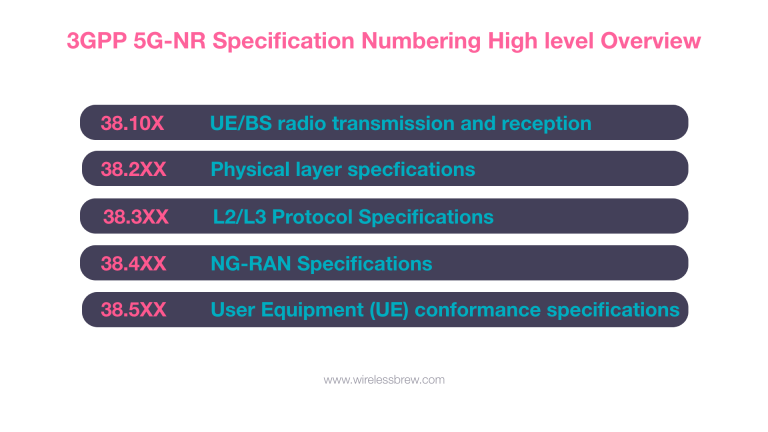
High-Level Overview of 5G-NR Specifications
For the scope of this article, I will be guiding with the help of 5G-NR 3GPP Specification documents (i.e., the 38.XXX Series).
I believe the following three items should help you navigate through the specifications:
- Decoding the Specification Numbering
- How to Navigate Through the Specifications and Referencing
- How to Read ASN.1 Encoding for RRC Messages (Not covered in this brief guide)
Decoding the Specification Numbering
Decoding specification numbering can be simple but might also quickly turn into complex decoding. Let's get started with the basics of the spec numbering.
All 3GPP specifications (UMTS and later release) have a specification number consisting of 5 digits (e.g., 36.101). The first two digits define the series followed by 3 more digits that relate to different specifications within the series.
The 3GPP Specifications are stored on the file server as zipped MS-Word files. So when you go and download a specification, you will get a zipped document with an alphanumeric .zip file.
Those filenames have a reason behind them and are named as per the following defined structure by 3GPP: SM[-P[-Q]]-V.zip
Each character field has the following significance:
- S = series number – 2 characters (see the table above)
- M = mantissa (the part of the spec number after the series number) – 2 or 3 characters
- P = optional part number – 1 or 2 digits if present
- Q = optional sub-part number – 1 or 2 digits if present
- V = version number
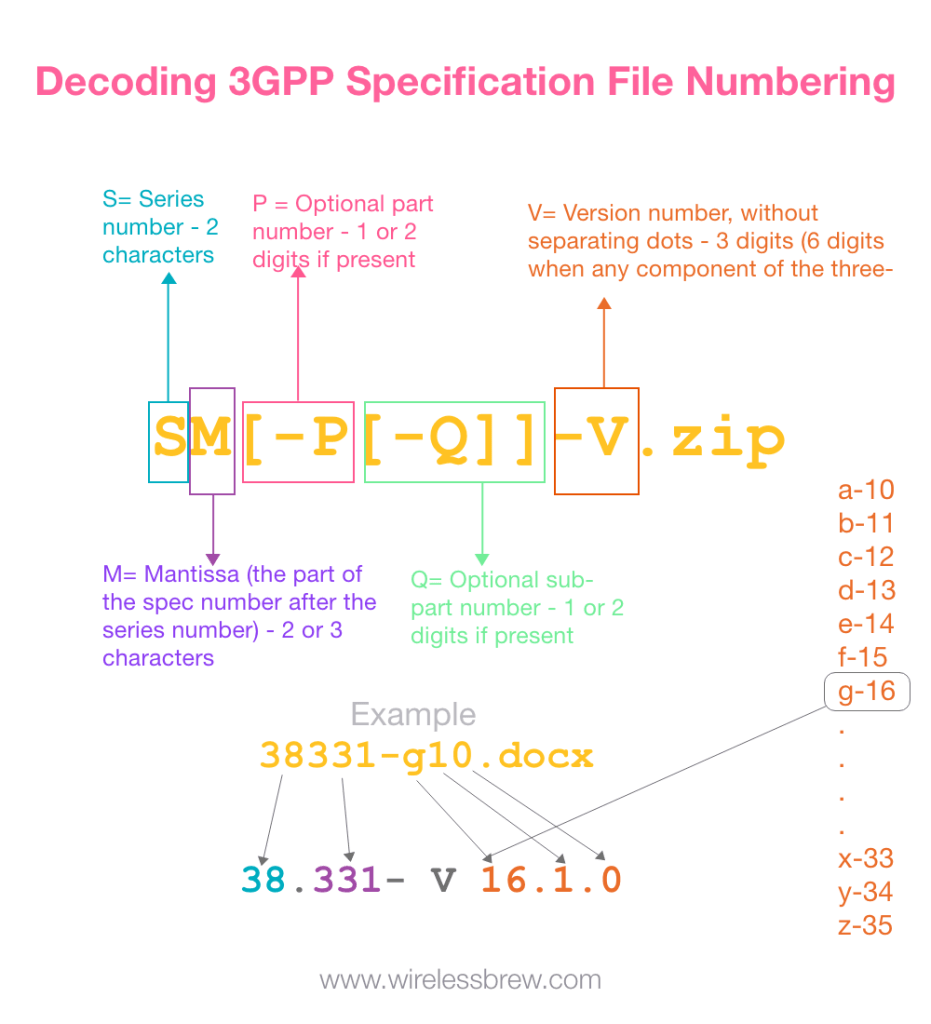
Decoding 3GPP Specification File Numbering
So for example, I will use the RRC Specification for 5G-NR as an example to navigate the specs.
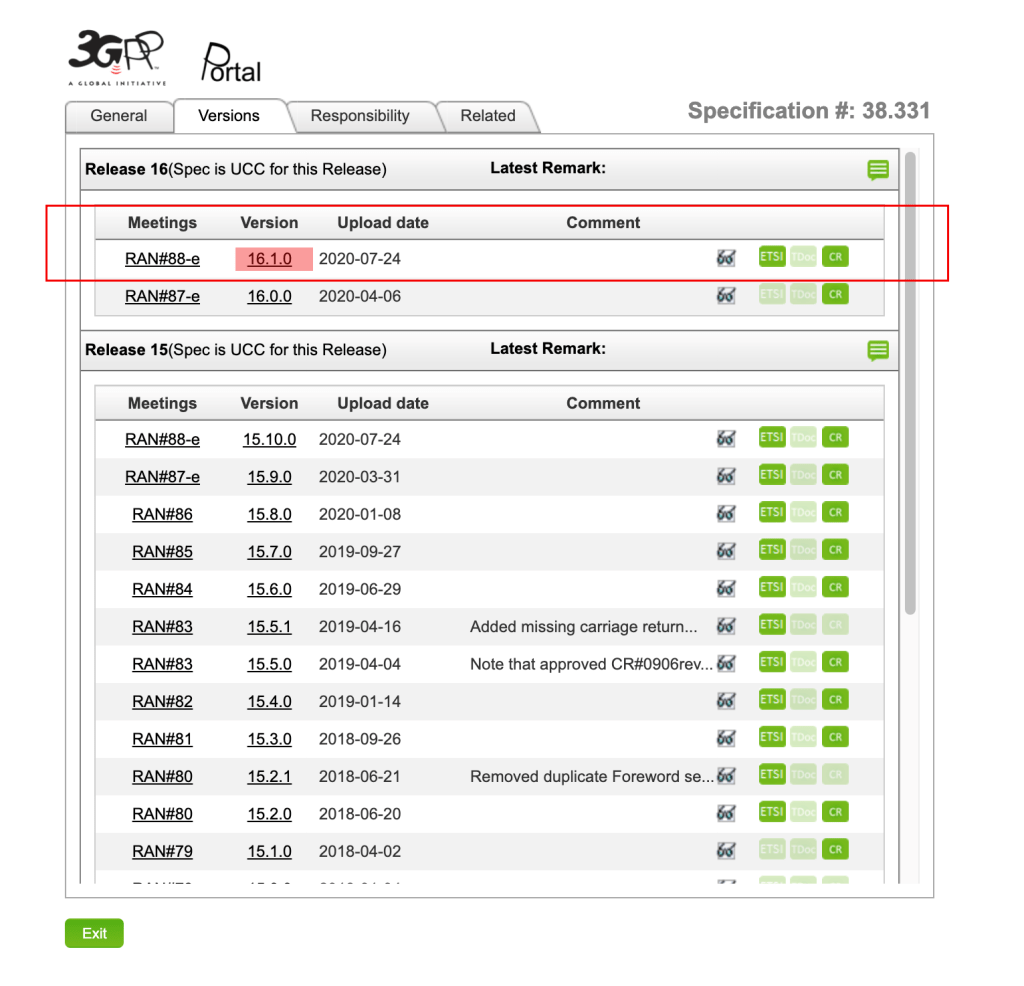
First, let's download the Specs for NR RRC from the link provided earlier. I will download the latest spec available at the time of writing. Once you click the version number, it will download a zip file, and it should look similar to 38331-g10.zip. After unzipping, it will reveal 38331-g10.docx. Now it’s easier to understand when you download once since you know which version of the specification it is. However, if you have a number of versions, it will get difficult to understand which folder belongs to which specification.
As per the structure shown above, it will translate into 38.331-V16.1.0.
Once you have downloaded the spec and open it, we will see a version number associated with each specification number, for example: 3GPP TS 38.331 V16.1.0
There is a pattern for the version number i.e., V x.y.z:
- x (First digit):
- 1: presented to TSG for information
- 2: presented to TSG for approval
- 3 or greater: indicates TSG approved document under change control
- y (Second digit): incremented for all changes of substance, i.e., technical enhancements, corrections, updates, etc.
- z (Third digit): incremented when editorial-only changes have been incorporated in the document.
How to Navigate through the Specifications and Referencing
3GPP specifications have a lot of references to other specifications. It’s always a good idea to go through the topic in the specification first and then go to the referring specifications for more details and clarifications on those topics. Specifications are interconnected with other specs.
There are two ways references are made in the specs:
- Same document with reference to a section number.
- External document Specification number with or without a section number.
Below is an example from the 38.331 Specification referring to a reference with a Section number in the same document and with a Clause and section number in an external document.
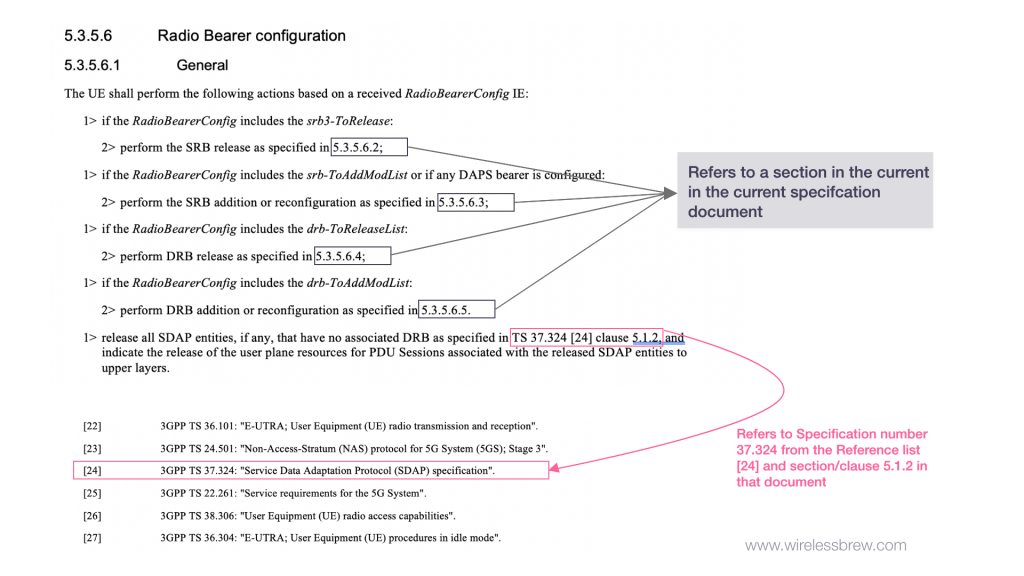
3GPP Specification References
Almost every topic in the specification has local references or references pointing to external documents. So, you just need to have multiple documents open to read through a topic.
Frequently Asked Questions (FAQ)
What exactly is 3GPP? 3GPP (3rd Generation Partnership Project) is a consortium of telecommunications standards organizations that develop protocols for mobile telecommunications, including LTE (4G) and NR (5G).
Where should a beginner start reading 3GPP specs? It is generally not recommended for complete beginners to dive straight into the technical specifications. Instead, start with overview diagrams, textbooks, or summary articles. Once you understand the core architecture (User Equipment, Radio Network, Core Network), you can start looking at high-level specifications or Technical Reports (TRs) before diving into deep Technical Specifications (TS).
What is the difference between a TS and a TR? A TR (Technical Report) is generally an exploratory document or a study that discusses a specific topic that may eventually be standardized. A TS (Technical Specification) is the finalized, formal standard that defines the required behaviors and protocols.
How do I know if I have the latest version of a specification?
The 3GPP portal organizes specifications by release. The latest finalized releases represent the most current stable standards. Under a specific specification number (e.g., TS 38.331), check the version string (V x.y.z). A higher x.y.z indicates a more recent version with newer additions or bug fixes.
Why are 3GPP specifications so difficult to read? Because wireless networks are incredibly complex, the specifications must cover every possible edge case, protocol interaction, and timing constraint to ensure equipment from different vendors can interoperate perfectly. This necessitates cross-referencing and highly precise, albeit dry, technical language.
Frequently Asked Questions (FAQ)
What exactly is 3GPP? 3GPP (3rd Generation Partnership Project) is a consortium of telecommunications standards organizations that develop protocols for mobile telecommunications, including LTE (4G) and NR (5G).
Where should a beginner start reading 3GPP specs? It is generally not recommended for complete beginners to dive straight into the technical specifications. Instead, start with overview diagrams, textbooks, or summary articles. Once you understand the core architecture (User Equipment, Radio Network, Core Network), you can start looking at high-level specifications or Technical Reports (TRs) before diving into deep Technical Specifications (TS).
What is the difference between a TS and a TR? A TR (Technical Report) is generally an exploratory document or a study that discusses a specific topic that may eventually be standardized. A TS (Technical Specification) is the finalized, formal standard that defines the required behaviors and protocols.
How do I know if I have the latest version of a specification?
The 3GPP portal organizes specifications by release. The latest finalized releases represent the most current stable standards. Under a specific specification number (e.g., TS 38.331), check the version string (V x.y.z). A higher x.y.z indicates a more recent version with newer additions or bug fixes.
Why are 3GPP specifications so difficult to read? Because wireless networks are incredibly complex, the specifications must cover every possible edge case, protocol interaction, and timing constraint to ensure equipment from different vendors can interoperate perfectly. This necessitates cross-referencing and highly precise, albeit dry, technical language.
Miscellaneous Tools & Calculators
WirelessBrew Team
Technical expert at WirelessBrew, specializing in 5G NR, LTE, and wireless system optimization. Committed to providing accurate, 3GPP-compliant engineering tools.
Up Next
More 5g nr Articles →